Use this play to…
Back from a joint assessment mission, need an end of year reflection before the festive season or perhaps your at a project milestone.
Teams use retrospectives to reflect on their way of working and continuously improve their integration by discussing current problems and goals, brainstorming new ideas, and exploring and planning which actions need to happen to keep moving forward.
Use the retrospective Play to run insightful meetings, take stock of your work, and iterate effectively. The goals are generally the same: discovering what went well, identifying the root cause of problems you had, and finding ways to do better in the next iteration.
One of the benefits of the retrospective format is that it gives equal power to all team members to open up and present their views.
Before you begin…
For remote teams, start by copying a version of the Miro template to a fresh board.
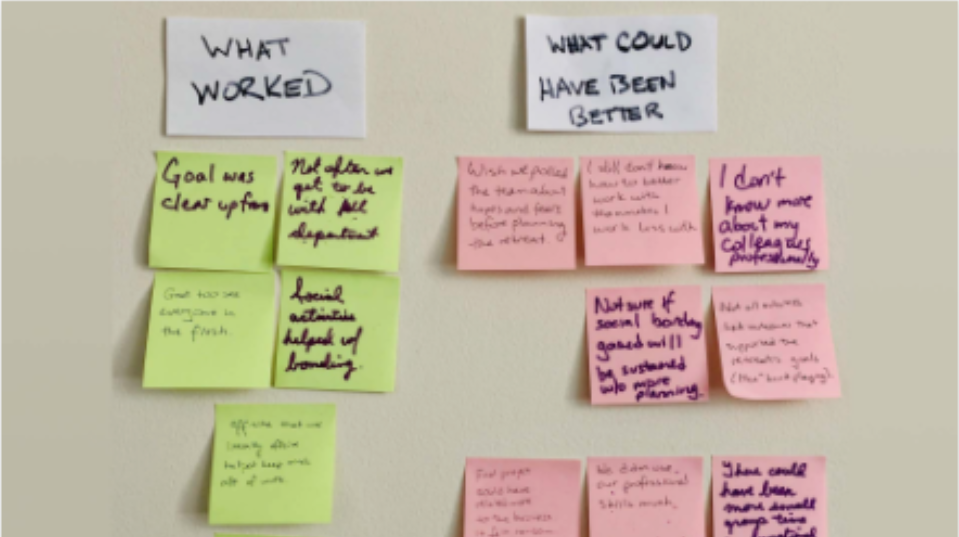
For in-person teams, find a whiteboard or large paper, and set out Post-It notes and markers in a meeting room. On the page, board, paper, or whiteboard, create three columns with the headings “What we did well”, “What we can do better”, and “Next steps”.
And, if possible, get a neutral third party to help facilitate the meeting. This will encourage greater participation and uncover more insights.
Who is involved
Anyone whose been intimately involved and has something to contribute.
Materials
Zoom with screen share (remote)
Whiteboard, or large sheet of paper
Sticky notes & markers
Timer
Running the Play
Step 1: Turn your brain on (5mins)
KEEP IT ORGANISED
Using the retrospective Miro template helps you avoid common pitfalls. For example, the goal of the retrospective is to brainstorm areas of improvement, but some staff may use the meeting simply to air their grievances. The template functions as a tool that allows you to stay on track and bring everyone back to your central questions: What did we do well? How can we improve?
Welcome everyone to the retrospective meeting and establish the rules of engagement. Modify the rules to fit your team’s unique needs. Add anything you think will help your team improve:
- Embrace a positive spirit of continuous improvement and share whatever you think will help the team improve.
- Don’t make it personal, don’t take it personally.
- Listen with an open mind, and remember that everyone’s experience is valid (even those you don’t share).
- Set the boundary of your discussion — is it that last workshop? The last T-period? Since the project started? Be clear how far back you’re going to go.
- Encourage the team to embrace an improvement mindset, away from blame.
If you’ve run a Retrospective previously, quickly revisit the themes and actions from last time to build a sense of continuity.
Step 2: What we did well (10mins)
CREATE A SAFE SPACE
Define how the information will be discussed after the Play. Will it be shared with leadership? Consider adopting the Chatham House Rule.
Start the session on a positive note. Have each team member use green sticky notes to write down what they feel went well (one idea per sticky).
As people post their stickies on the whiteboard, the facilitator should group similar or duplicate ideas together.
Discuss each one briefly as a team.
Step 3: What needs improvement (10mins)
VIRTUAL TIP
The Miro retrospective tool template can help make your next workshops or projects more productive. Use the Miro template and customize it in a few seconds—all changes will be saved instantly! Communicate with your team in real-time. You can use the Miro chat or @mention features to boost engagement. If you have some people writing out physical sticky notes, simply take a photo of the finished whiteboard and upload it to the Miro whiteboard. In Miro you can also include other file types such as images, videos, GIFs, and documents to store everything in one place.
Same structure as above, but using pink or red stickies.
Remind your team that this is about actions and outcomes — not about specific people.
Step 4: Next steps (5mins)
Having identified what didn’t go so well, what concrete actions can the team take to improve those things? Have your team use blue sticky notes to place ideas on the board. Group them and then discuss as a team, agree to which actions you will take, assign owners and a due date to get them DONE.
Thank everyone for their involvement and their honesty. Quickly run through the list of follow-up items, their owners, and due dates.

Variations
A) Past two-months map
Create a timeline spanning the past two months and have team members call out significant events. Doing this at the start of the Play helps refresh everyone’s memory and sets the stage.
KUDOS
This Play is modelled off the Atlassian “Retrospectives’ and Miro ‘Retrospectives’ material.
B) Dot voting
If a lot of ideas emerge in the “Actions” category, vote on which ones you’ll immediately prioritize.
If you’re using Miro, have the team vote on the three ideas they’d like to see at the top of the list by adding their dot. Select owners for the top-voted items.
For in-person meetings, everyone grabs a marker and places a dot on their top three preferences. Tally up the dots and follow same step as above.