IP HealthCheck

The IP HealthCheck is a collaborative tool for teams to understand if you have the right pre-conditions to integration to flourish. It is the first step in having a conversation within your team to unpack what it means to do IP well, by looking at eight key attributes for success.

By the end, you’ll have a shared understanding of where you are today with IP, where you want to be, and how to get there.

Over the years, we’ve observed attributes common amongst NRC teams championing integration (case studies say it all). The IP HealthCheck is a chance for you to get a reading on each of them - to check your vital signs if you will. From there, you can run other Plays that change the way you work so you’re building muscle in your weak areas and follow up with quick checkpoints to track your progress.

The IP HealthCheck is about the pre-conditions for integration so you can run it at any time. For consistency, we recommend running the IP HealthCheck every T-period, with quick checkpoints in between.

image

New to the IP HealthCheck? Let us guide you through it.

We will take you step-by-step through an IP HealthCheck, record results, and recommend next steps for your team.

Start IP HealthCheck

Unpacking the IP HealthCheck

The purpose of the IP HealthCheck is to self-assess whether your team has the right pre-requisites for integration to flourish. Brutal honesty is the key here. It’s not all doom and gloom, though: you’ll uncover good things too, and exchange some high-fives…

You’ll be assessing your health strictly within the context of the operation you’re working within. This might be within a CO, AO, consortium or other type of team. There are no right or wrong answers, and everyone’s opinion is equal.

It is not a performance or assessment tool designed to rate you and your team. You do not have to share your completed HealthCheck with anyone. The value of the IP HealthCheck is not in the ratings; it is in the conversation you and your colleagues have as you work through the attributes.

Note: It is not designed to help you design a programme or explain the what & why of IP (check out the IP Foundations Play). But It will assist your team with identifying priorities for including in strategy documents.

Who is using it

Check out who is loving the IP HealthCheck recently

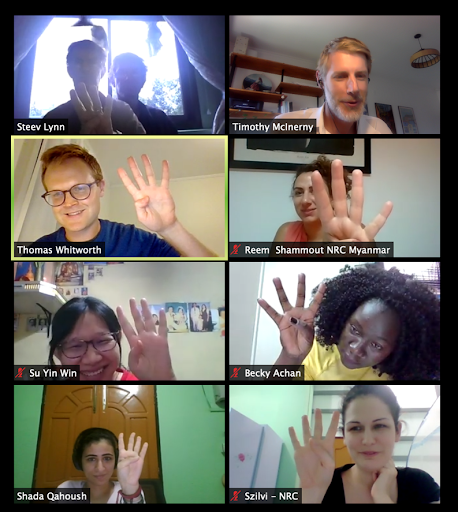
Myanmar Programme Unit voting on “how valuable was the IP HealthCheck session?”

The IP HealthCheck explores eight attributes that together contribute to enable integrated programming success. Anybody can run a health check at any time; there is no need to wait for permission!

If your team includes 8 or more people, you might want to divide into sub-groups and work through the initial ratings for each attribute. Then, come back together and converge on full-team ratings.

How you think about the five fingers will be unique to your team. Use your intuition and don’t worry about establishing standardized criteria for each finger (yes, speaking to you Engineers!) – that only distracts from the discussion.

Make sure each person has a voice and a chance to contribute to their group’s ratings individually before moving into whole-team discussions.

Resist the temptation to solve problems, and just focus on observations.

Firstly, congratulations on scheduling time for you and your team to give headspace to integrated programming!

The IP HealthCheck is still in beta, so the following are tips we gathered from other use-cases that will help facilitators get the most out of the session!

  1. The IP HealthCheck is designed for self-facilitation. The Team Leader (HoP, AM, PM etc) should be familiar with the IP HealthCheck and come prepared to facilitate discussion.

  2. We suggest blocking out 2hrs, to allow for enough time for discussion. See session plan below…

  3. Skim the HealthCheck beforehand – take five mins to click through and get a feel for the flow and functionality.

  4. Nominate an assistant - A person to assist the facilitator by tallying the fingers and signalling the need for a conversation where there are divergent ratings. Note: no need to add-up & divide numbers.

    • This person should also be responsible for taking notes throughout the session, particularly where conversation happens about why people rated it as they did. Notes will help when it comes time for action planning!
    • Assistant should also help with time-keeping. Aim for approximately 10mins per attribute.
  5. Setup the technology -

    • Videos on! Remind everyone they should use gallery view on Zoom.
    • Ensure everyone is unmuted throughout (much better for free-flowing discussion)
    • The facilitator should be prepared to share their screen as the HealthCheck is happening.
    • The facilitator may need to enlarge the size of text in their browser to make it easily readable by participants. Use Control + + or Control + scroll wheel on your mouse to do this.
    • Recording of the session isn’t needed
Time Session Instructions Notes
5 mins Welcome and overview
  • Get everyone settled
  • Reminder on why is IP important for the team?
  • Agree Zoom etiquette for the session (e.g. cameras on, unmuted, how to use chat)
  • Be sure to contextualise the HealthCheck into your team’s broader work, why it’s important and how it fits in the bigger picture
5 mins Instructions
  • Walk through the introduction to the IP HealthCheck
  • ntroduce facilitator and assistant roles
  • Confirm participants understand what the process
70 mins HealthCheck Attribute Questions
  • There are eight attributes. That means about 8-10mins per attribute.
  • For each attribute, read the short statement about what it is
  • For each sub-attribute, read the question and the statement
  • After each, click count down (3, 2, 1…) while people rate using their fingers (1-5)
  • If conversation is needed, facilitate a brief (2-3 minute) conversation. Call on those with divergent responses (e.g. a 2 and a 4) to share what is behind their rating.
Repeat for each attribute/sub-attribute
  • Length will depend on size of group and degree of consensus
  • Don’t worry if the first few attributes take more than 10mins, it will get quicker as you go
  • If your team members tend to “settle” or call something “okay” when it really isn’t, start with one finger as the default rating for all attributes, and make groups justify their way to a five-finger rating.
  • Assistant to take note of key points from any conversations
30 mins Action Planning
  • Facilitate a short conversation on how people feel about the overall outcome
  • Identify 3 attributes that the team wants to focus on improving in the next 1-3 months (if strategy season you can also think about what to reflect in the BSC)
  • For each focus attribute, facilitate a conversation about what the barriers to success are (Why are we not already doing this?), what the future state might look like (What is our ambition here? Why is this important to focus on?)
  • Document the next steps in the HealthCheck tool, and assign responsibility for them
  • As a team, agree on the timing of the next HealthCheck
  • You may want to offer a 5 min break between the rating and the action planning
  • This is the point Tim and team can come in, if needed
5-10 mins Close
  • Check out of the session – one-word takeaway or overall sentiment of the team by asking “was this a good use of our time?” and then ask everyone to vote with fingers
  • Email the HealthCheck summary with all participants (also share with the IP Initiative)
  • You may want to export the Zoom chat